Say “directory website” to most people who’ve researched building one, and they picture the same thing: a WordPress install, a directory plugin, a theme built for listings, some customization on top.
That’s a reasonable default. It’s also not how I build mine, and the difference matters more than it might sound like.
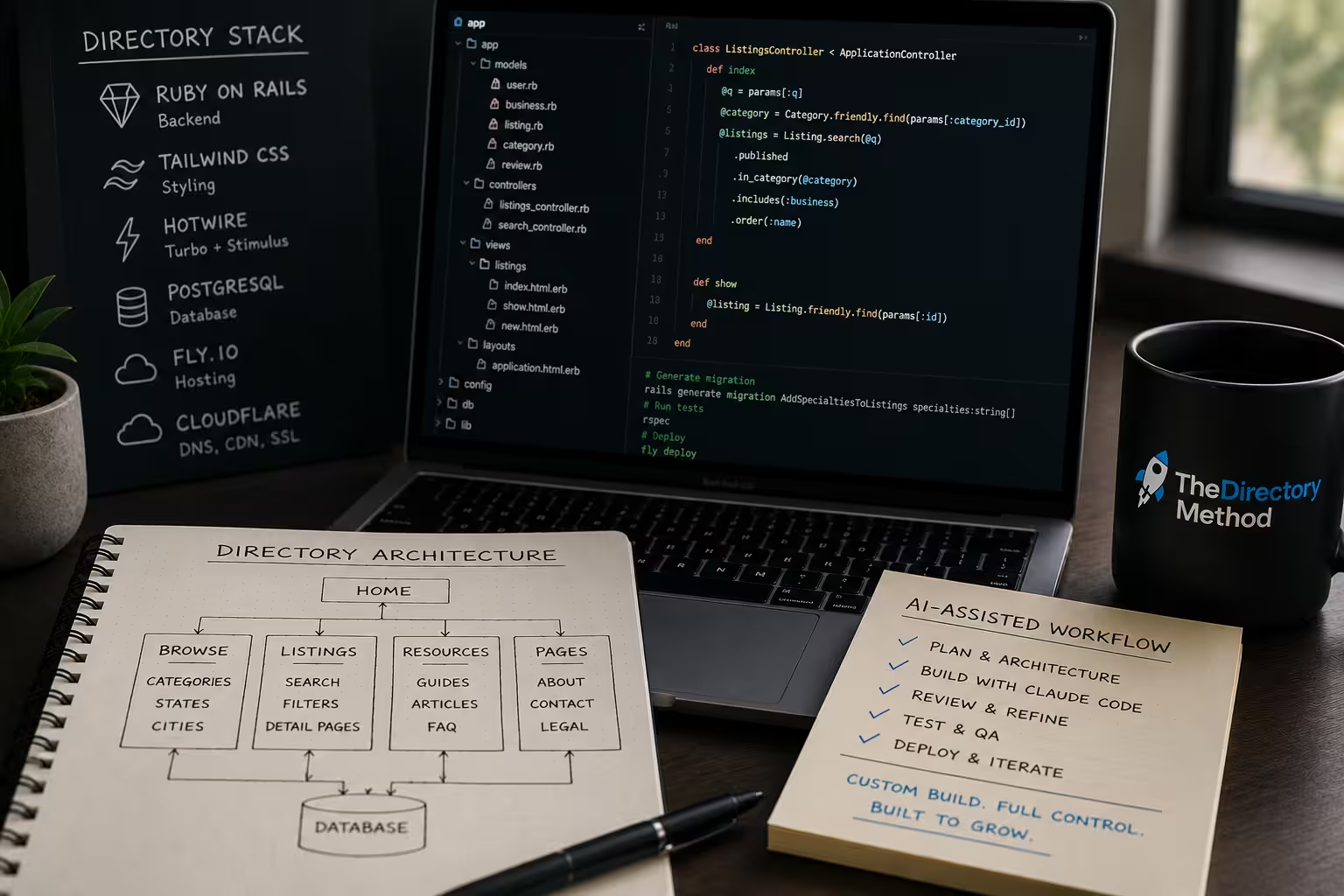
Every directory I run is a custom-built application: Ruby on Rails, a real database, hosted on my own infrastructure, no plugin underneath it.
I build them with AI-assisted development, using Claude Code as a coding partner, which is what makes a custom build realistic for one person instead of a multi-month project.
This post is about that workflow specifically: why I don’t use a plugin, what the actual stack is, how the vibe coding part works day to day, and where it genuinely saves time versus where it doesn’t.
Why not just use a plugin
A directory plugin gets you to a working site fast, and I don’t think that’s a bad way to start if speed-to-launch is the only priority. But it comes with real constraints that show up later, not on day one:
- The data model is generic. Plugins are built to handle any kind of listing in any kind of niche, which means the fields they give you are generic too. The enrichment that actually differentiates a good directory from a thin one (specialties, credentials, service areas, whatever matters specifically in your niche) usually means fighting the plugin’s assumptions about what a “listing” is, not extending them cleanly.
- Everyone’s site looks and behaves the same. If the plugin is popular, so is the theme, so is the layout, so is the exact set of default pages. That’s not a launch problem. It’s a differentiation problem that compounds over time.
- You inherit someone else’s technical debt. Plugin updates, theme conflicts, compatibility issues, none of that is really about your business, and all of it eats real time.
None of that makes plugins the wrong choice for everyone. It’s a real tradeoff: less flexibility and less differentiation in exchange for genuinely faster time-to-first-launch, especially without any development background.
But it’s a tradeoff worth naming explicitly rather than assuming a plugin is simply “how directories get built.”
The actual stack
I use the same foundation across every directory I build, deliberately, so each new build starts from a proven pattern instead of a blank page:
- Ruby on Rails for the backend. Mature, convention-driven, and fast to build in once the patterns are established.
- Tailwind CSS for styling, Hotwire (Turbo and Stimulus) for interactivity, instead of a heavy JavaScript framework. The result is server-rendered, fast, and naturally SEO-friendly, without the complexity overhead of a full single-page-app architecture that a directory site doesn’t actually need.
- PostgreSQL for the database, with each directory owning its own independent database rather than sharing state across sites.
- Fly.io for hosting and Cloudflare in front of it for DNS, CDN, caching, and SSL.
None of this is exotic. That’s intentional. The goal isn’t to use interesting technology, it’s to use technology mature enough that I’m rarely debugging the framework itself, so nearly all my time goes into the actual business logic: listings, search, enrichment, content.
Where the AI-assisted part actually fits in
This is the part that changes the math on custom development being realistic for one person. Claude Code functions as a coding partner I work with directly, not a code generator I run once and walk away from.
The workflow looks less like “describe a feature, get a finished app” and more like an ongoing collaboration: I direct the architecture and the priorities, it writes and edits real code against that direction, and I review and correct as we go.
The part that makes this compound across multiple directories, rather than starting from zero each time, is that I maintain a shared set of standards documents: architecture patterns, data model conventions, SEO and content standards, technology stack decisions, directory structure.
When I start a new directory, those standards are the context Claude Code works from. It’s not relearning my conventions from scratch on every project, and I’m not re-explaining them from scratch either.
A new site’s foundation gets built consistent with the last one automatically, because the standard, not my memory of the last project, is what’s driving it.
A concrete example of what that looks like in practice: adding a new enrichment field to listings, say a new attribute that matters for a specific niche, credentials, service options, whatever’s relevant.
In a plugin-based site, that might mean fighting a rigid data model or a page builder that wasn’t designed for it. In my workflow, it’s a database migration, a form field, a display update, and an update to the underlying listing standards document, done in one focused session, following the same pattern I’ve already used for every other enrichment field on every other site.
The pattern being established once and reused repeatedly is what makes each additional field, each additional page type, each additional directory faster than the one before it.
What AI-assisted development doesn’t replace
This is the part I’d want a skeptical reader to hear directly, because the honest answer matters more than the impressive-sounding one: AI-assisted development speeds up implementation.
It does not make the underlying business decisions for you, and treating it like it does is how you end up with a fast, well-built site for a niche that was never going to work.
Specifically, it doesn’t replace:
- Niche validation. Whether a niche is actually worth building in is a research question, not a coding question. No amount of build speed rescues a niche the data says isn’t winnable.
- Data sourcing judgment. Deciding which data source is trustworthy enough to build a directory on top of is a research and verification problem, not something an AI coding partner resolves for you.
- SEO and content strategy. What to write, what search intent to target, how to structure information architecture for a specific niche, these are still decisions that require understanding the niche, not just the technology.
- Editorial judgment. Reviewing AI-drafted content and data for accuracy, tone, and genuine usefulness is still a human job. AI can produce a first draft quickly. It shouldn’t be the last set of eyes on anything that goes live.
What AI-assisted development actually buys you is time: the implementation portion of building a directory (the part that used to require either deep personal development skill or hiring it out) shrinks dramatically, which means more of your actual time budget can go toward the parts that determine whether the business works at all: research, data, content, and the ongoing operating work of running the site.
Getting started without a development background
You don’t need to already be a software engineer for this approach to be realistic, but you do need to be willing to direct the work closely rather than treat the AI as a black box you prompt once. In practice, that means:
- Start from clear standards, even simple ones, before you start building. Decide your site structure, your listing fields, your URL patterns, on paper first. Feeding that clarity into the build process is what keeps the output consistent and correct.
- Review everything. Treat AI-generated code the same way you’d treat a first draft from a junior collaborator: probably mostly right, definitely worth checking, especially anywhere real user data or money is involved.
- Reuse what works. Once a pattern (a page type, a data structure, a workflow) is right on one project, that pattern is your template for the next one. The compounding benefit shows up on the second directory, not the first.
Where this leaves the four-part story
Niche validated with real data. A plan and structure in place before writing a line of code. Listings sourced, verified, and enriched on purpose instead of by accident. And a build process that lets one person maintain custom, differentiated infrastructure across multiple directories without it consuming every available hour.
None of the four posts in this series describe anything unusual on its own. Validate before you build. Plan before you code. Get the data right. Use the right tools well.
What’s unusual, if anything, is doing all four in sequence, deliberately, every time, instead of skipping the boring parts because the exciting part (the actual website) is right there waiting to be built.